2026-07-13
Recording Online Radio with Stream Subscription
A C# library and a full-stack app that rip online radio streams into tagged MP3s.
Background
Online radio stations (IceCast/Shoutcast streams) play a continuous audio feed, but they don't hand you the individual songs. I wanted a way to "subscribe" to a station and have every track it plays land in my music library as a properly tagged MP3 -- without downloading and storing anything myself.
This turned into a few projects that build on each other: a low-level ripping library, a directory crawler, a backend service, and a web UI. You can try the live app at stream.coolify.hesamian.com.
Stream-ripper (the library)
At the bottom of the stack is Stream-ripper, a C# library published on NuGet. It connects to an IceCast stream, reads the inline metadata, and splits the continuous byte stream into separate songs -- firing an event each time a track changes so you can save it as its own MP3.
The API is event driven:
var streamRipper = StreamRipperFactory.New(new StreamRipperOptions
{
    Url = new Uri("https://your-radio.example/stream"),
    MaxBufferSize = 10 * 1000000 // stop a song if it passes 10 MB
});

streamRipper.SongChangedEventHandlers += async (_, arg) =>
{
    var filename = $"{arg.SongInfo.SongMetadata}";
    await arg.SongInfo.Stream.ToFileStream($@"\Music\ripped\{filename}.mp3");
};

streamRipper.Start();
It exposes hooks for the whole lifecycle --
OnStreamStarted,
OnMetadataChanged,
OnStreamUpdate,
OnSongChanged, and
OnStreamEnded
-- and wraps every handler as async under the hood.
shoutcast-directory-crawler (finding stations)
Before you can subscribe to a station you need to know it exists. shoutcast-directory-crawler is a small Node.js scraper that crawls directory.shoutcast.com and pulls out each station's metadata -- name, genre, bitrate, listener count, and stream URL -- into a big JSON catalog.
I wrote it because I asked SHOUTcast for an API key and never heard back after months, so scraping the public directory was the pragmatic way to get a station list to feed into the app.
stream-subscription-api (the backend)
stream-subscription-api turns the library into a real service. You give it a stream URL and credentials for a file-sharing target, and it rips the stream into MP3s and uploads each finished song to your storage (FTP, Dropbox, and friends). The service never keeps the files -- it only stores them where you told it to.
It's a .NET app that leans on a few things:
- Stream-ripper to do the actual ripping
- SignalR to push live logs and now-playing info to the browser in real time
- ReactiveX to manage the concurrency of multiple subscriptions
- Entity Framework Core as the ORM
- ASP.NET Identity for authentication
stream-subscription-ui (the frontend)
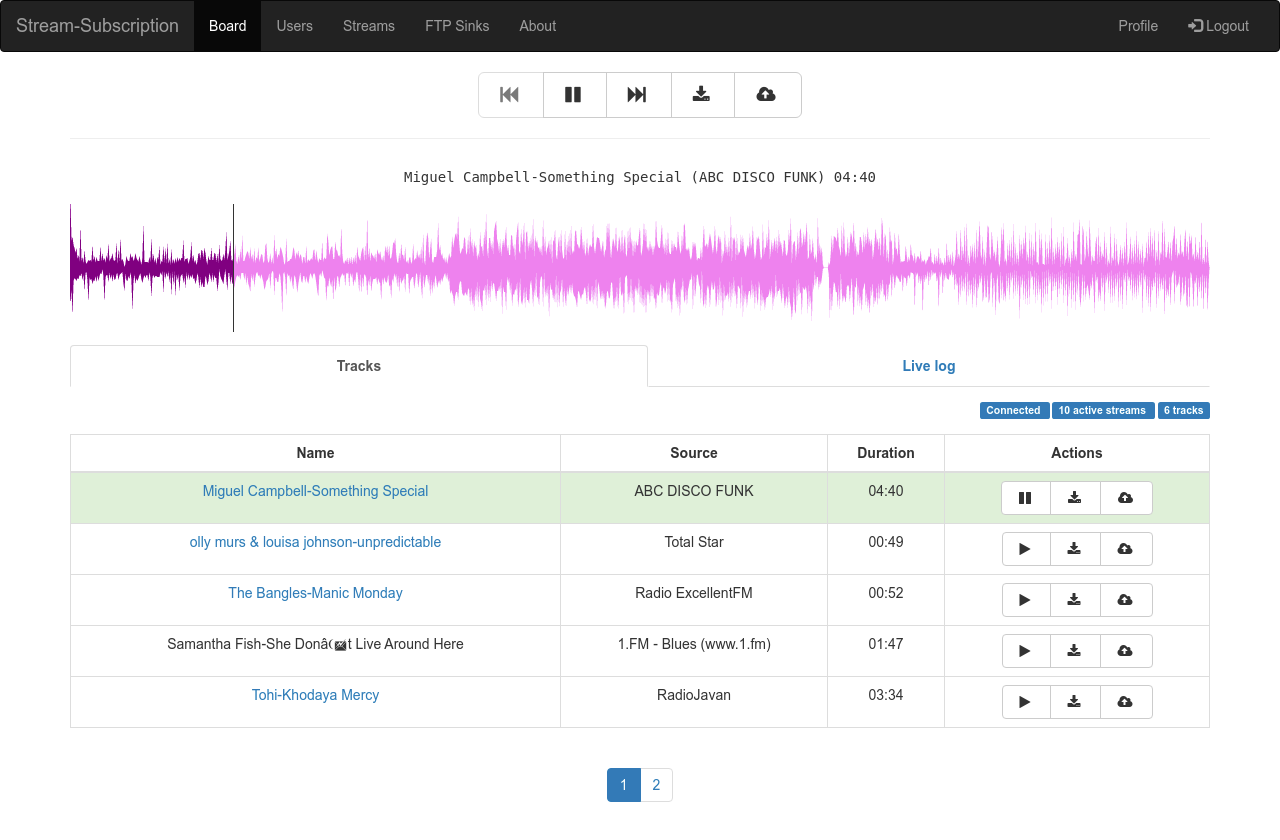
stream-subscription-ui is the Angular front-end where you manage your subscriptions and watch songs get ripped live. It's built with Angular 8, Angular Material, and ngx-bootstrap, and talks to the backend over SignalR so the log and current track update as they happen.
A couple of fun touches:
- Wavesurfer.js renders the audio waveform for playback in the browser
- The Media Session API wires up lock-screen controls and Android Auto / Apple CarPlay integration, so it behaves like a proper media app on a phone
Wrap up
What started as "I wish I could grab songs off this radio station" grew into a reusable NuGet library and a small full-stack app around it. The library is the piece I'm happiest with -- it's a clean, event-driven way to turn any IceCast stream into a tagged music library, and it's the part other people have actually picked up and used.